Services
From makeovers to personalized skincare consultations
From makeovers to personalized skincare consultations

Get inspired, play with products & learn new skills

Exciting launches, parties & more

Explore what's hot in your store


Ask questions, join challenges, and get recommendations from people like you

Discover topics tailored to your beauty interests

Add your photos and get inspired by fellow beauty lovers
 Sign In

View activity, savings and benefits
Redeem items, samples and more
View and track online orders
Reorder it from in-store and online purchases
View saved products
Recommendations from your store visits
Manage your services, classes and events
Complete your beauty traits for personalized recommendations
Payments, contact info, addresses and password
 Sign In
View activity, savings and benefits
Redeem items, samples and more
View and track online orders
Reorder it from in-store and online purchases
View saved products
Recommendations from your store visits
Manage your services, classes and events
Complete your beauty traits for personalized recommendations
Payments, contact info, addresses and password
Ask questions, join challenges, and get recommendations from people like you
Discover topics tailored to your beauty interests
Add your photos and get inspired by fellow beauty lovers
From makeovers to personalized skincare consultations
Get inspired, play with products & learn new skills
Exciting launches, parties & more
Explore what's hot in your store
Hello beautiful Beauty Insider Community members!
We’re starting this thread for you guys to report any issues and weird things that you are seeing or ask any questions. We have a number of issues logged that we are already working on a fix for, so this is a work in process.
Some things to note as you are reporting issues:
Some tips:
It’s good to see you all and thanks for being patient!
Whenever reporting a bug we need as much info as possible or our tech team cannot reproduce the issue and verify it's actually occurring. If they can't see the issue they cannot fix it. You cannot overshare details, test on too many devices or share too many screenshots... The more detail the better!
This has been my experience as well, @haleyvvvv. Especially when I've got both a tag and a photo in one post, but usually just clicking on "post" a second time will let it go through.
Thanks for this @Anonymous! Looking into the issue with our vendors - I'll let you know any updates asap!
@KatieBT I'm positive I saw this reported before but: some pre-BIC-update posts still have empty spoilers. I just found and fixed one of my own: https://community.sephora.com/t5/Insiders/Love-for-Brushes/m-p/5444170/highlight/true#M127099
When I first went to that post, the spoiler tags were there but they were completely empty. I clicked Edit to see if the spoiler content was still there but hidden; it wasn't. 😞 I fixed a typo in the rest of the content and clicked Save. That got me the "invalid html was found in your post" error—and hey, that made the missing spoiler content appear! Yay! But when I clicked Save and saw my updated post, the spoiler tags weren't collapsed: they were permanently open, with no way to close them. Boo!
Soooo, I clicked Edit again, copied the spoiler content, created a brand new spoiler tag in my post, pasted the original spoiler content into the new spoiler tag, and deleted the old spoiler—which was very wonky, because selecting and deleting the entire old broken spoiler got rid of the spoiler box but left the content behind. So I had to reselect the old content and delete it. But then I clicked Save and my post displayed collapsed spoilers that functioned correctly, and all was right in the world.
I'm saying all this in case anyone else notices one of their old posts is suddenly missing spoiler content and wants to try getting it back by editing their posts. It's still there, but you won't see it until your edit errors with "invalid html," and afterward you'll have to drop the original spoiler content into brand new spoiler tags. Kind of a pain, but it's a workaround.
@KatieBT @TeamBIC I found a second post of mine with broken spoilers. This time I took some screenshots to show what's happening. I also ran into another frustrating issue in the process. I'm doing all this via my MacBook Pro with Google Chrome. I cannot imagine trying to do this on a phone. 🤣
The post in question: https://community.sephora.com/t5/Dry-Skin/Does-anyone-have-a-great-skin-regimen-for-VERY-dry-sensiti...
That one's long. It contains several spoilers, and I'm pretty sure there are bulleted and/or numbered lists in some of them. There are definitely product tags in them. Note that all tagged products still appear below that post.
An enhancement request, before I begin: PLEASE PLEASE PLEASE give us a character counter on the Reply to Post page. Yeah, I know, "well if your posts weren't so dang long in the first place, you wouldn't get the character limit error!" But I suspect html code counts toward the 20,001 character limit. (Is that true or false? I'm genuinely curious.) And we no longer have any control over the html tags used in our posts—so we can't strip out any extraneous code that might be inserted by an app on our computers/devices. MS Word used to generate tons of useless code when content was copy/pasted from Word into a text box like this one. I don't know if MS ever fixed that, but I know iOS/Mac OS Notes also generates some useless code when copy/pasted. Ideally, html code wouldn't count at all toward the character limit.
Okay, back to that post of mine...
Here's how it looked before I did anything to it:

I selected Edit and saw this:

When I tried to select all my post content (to copy it all—which I always do so I can paste it instead of retyping it, in case my BIC session times out and I lose my post/edits), this weirdness happened:

I clicked Cancel, went back to that post, and selected Edit again. Without making any changes, I clicked Preview to see if I could get the "invalid html" error and see my original spoiler content. Instead, I got the character limit error:

I'm guessing the character limit is why my content got all weird when I tried to select it. But without knowing how many characters my post contains, I can't quickly edit it down. Now I have to copy all that content and drop it into some app on my laptop that'll count characters. This is why we (well, the verbose among us 😂) need a character counter on the Reply to Post page. Since I suspect html characters are included in that limit, I'll also view source code of that post, copy ALL characters from my post, and do a character count that includes the html.
Then I'm gonna have to redo that entire post from scratch. Because you see, I can't edit the html at all anymore so I can't simply remove extraneous code like I could before. And I only want to attempt editing that post one time, so I'll probably have to rewrite parts of it anyway and just create brand new spoilers. I might even try splitting that post into 2 halves. But I'm not gonna do it right now because I'm too frustrated by this whole experience. Sigh...
I realize the html editor was probably removed thanks to certain spammers who abused it. But it really sucks for those of us who know html and aren't malicious. 😞
UPDATE: I lied about not messing with any of this further tonight. The original post, with all html tags stripped out and the original spoiler content included, is 10,601 characters long (including spaces). That's well below the character limit. This tells me html code is definitely included in the character limit.
When I looked at the source code of my post... good grief, what a mess! The spoiler content is duplicated and hidden (via weirdly nested noscript tags) in the code. That explains some of the glitchy functionality to me. Let's ironically drop this screenshot into a spoiler:
 I didn't change any of this code. I simply indented many lines of it, so I could figure out what the heck's going on.
Yep, I'm definitely redoing this skincare post from scratch. Later on. Tomorrow. 🤣
Hey @WinglessOne - thanks for the callout on some old spoiler tags not working! As an update, our partners are still working on the issue of bulleted lists not working in spoiler tags - I see that problem has not yet been fixed.
Thanks for the update on bulleted lists, @GeorginaBT ! I'm sure others will be as happy as @ShortErica and I when this is finally resolved. 🙂
Wait so how do I do this without the html editor feature @WinglessOne? Just edit something else in the post and it will then open the spoilers up permanently? My past posts containing spoilers with bullet points won't open which is frustrating.
@ShortErica I'm looking for another of my old posts with bullets in spoilers now, to see if I can fix it the same way I fixed the post I linked to. (That post had no bullets in spoilers, but it did have a photo in a spoiler—and I think the second spoiler might've originally contained 2 photos, since I see 2 captions but only 1 photo... argh.)
But yeah, if you edit your old post, you should get access to all post content except whatever was in the spoiler; that content will be missing. If you click Post—or, try clicking Preview instead—you should get the invalid html error. BIC/Lithium's attempt to correct the html should reveal your spoiler content. If you click Post after that, your post should appear with the original spoiler content. The spoiler tags will be non-functional though, meaning they'll appear open with no way to close them. Kinda defeats the purpose of spoilers. 😂 To make them functional, you have to re-edit your post and do that copy/paste dance I mentioned.
Can you link to the post you're trying to fix?
@WinglessOne here's the page with my post
The spoilers won't open. This is my post for June so I'll find my one from May to mess with.
I messed with my May post. Interesting how it turned out. There seems to be unspoiled with bullets and then a repeat with no spacing or bullets under it.
@ShortErica Yep, both of your posts show exactly the issues I mentioned in my post up there. 🙂 In the June post, the spoilers are completely inoperative. That's happening with mine, too. In the May post, after you edited, the spoiler content's visible inside spoilers that are permanently open, which defeats the purpose of a spoiler tag. To fix that issue, you have to edit that May post again, but this time redo your spoilers: add new spoiler tags, copy/paste the old spoiler content into the new spoiler tags, and then delete the old spoiler content.
Note that you'll probably have to delete the old content twice: the first attempt will remove the spoiler field but not the copy that was inside it. 🤦♀️
I SO wish we still had the html editor, especially after messing with another of my broken posts a few minutes ago... I'm pretty frustrated now.
That leaves me with I think one last question @WinglessOne, can you put bullets within a spoiler (even for a new post)? Any time I put a spoiler then press the bullet icon it goes out of spoiler mode. Am I missing something?
@ShortErica Nope, I still can't create bulleted (or numbered) lists inside spoilers. I have to create the list outside the spoiler tag (make sure you start the list at least 2 line breaks—err, 2 returns—below the spoiler tag to get completely clear of the spoiler div), then copy/paste the list into the spoiler.
Ello!
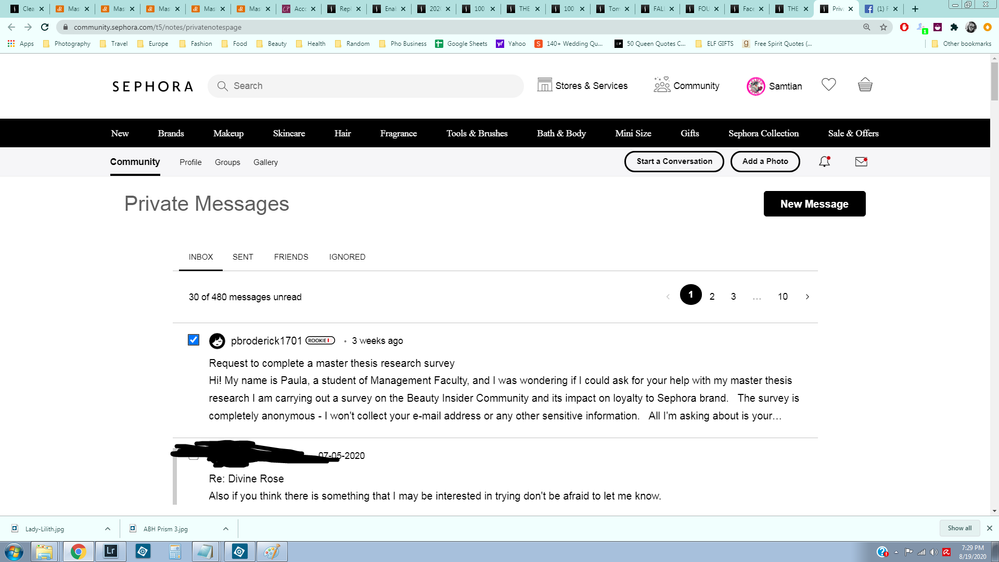
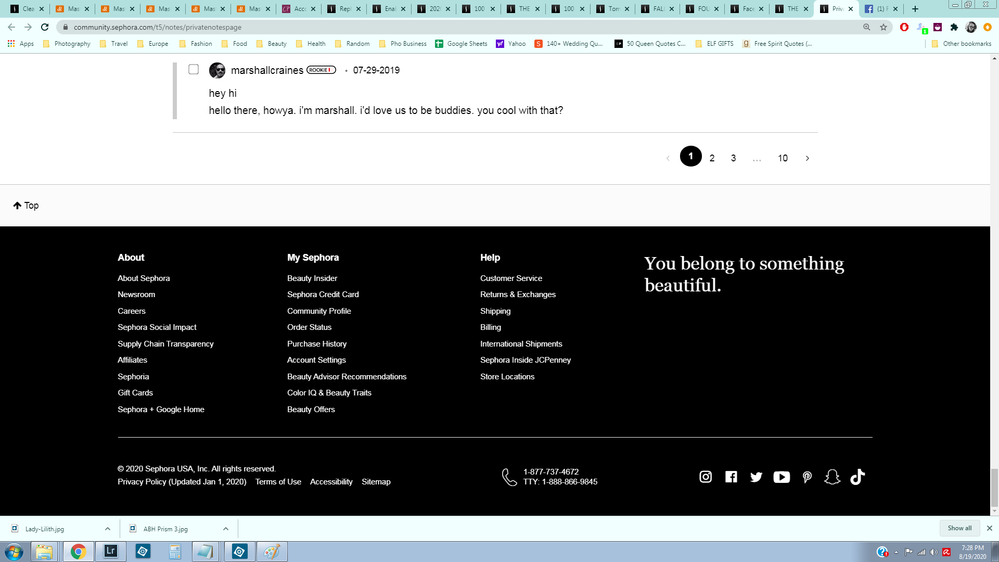
On the desktop, I haven't tried mobile/app so maybe someone can chime in on that, but the messages area doesn't seem complete to me. I can click a little square box, as though I am going to delete or mark as read, but no options come up at all. Anyone else have this problem?
Oooh, would you mind taking a screenshot of what you're seeing @Samtian? Want to understand exactly what is being displayed on your end so we can share with our vendor partners if needed. 😊 Thanks!
@GeorginaBT Hope this helps! I have one message clicked, but no options to do anything with it. I've included a shot of the beginning and bottom of the page.
An odd experience indeed, @Samtian! Thanks so much for these screenshots - passing onto our vendor partners so they can take a look.
Whew, thanks again for bringing this to our attention @Samtian! We confirmed it to be a bug, and the checkboxes should no longer display in your private messages inbox (seeing as there is currently no option to action off selected messages)! Please just let us know if you're still seeing the checkboxes~ 😊